
How to do a Global Name Change

In Ostendo the key field of a record is not editable as this is how Ostendo uniquely identifies that record. The field can be edited using the Global Name Change utility under File>System Configuration.
This change will update all historical records in the system with the new value. Because it is such a significant change you must be the only user logged into Ostendo o be able to run this utility. You should take a backup of the database before running this utility.
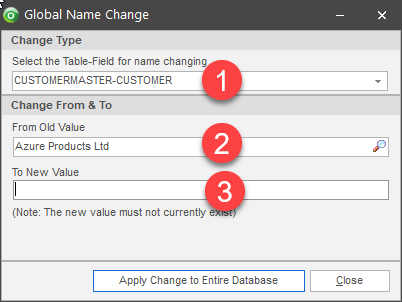
- Select the table and field combination you wish to change. Please contact us if you are in any doubt about the correct combination to use.
- Look up the existing value from the database.
- Type in the new value and click 'Apply Change to Entire Database'
The most common table and field combinations for global name changes are below.
Important Note: If you are changing customer or supplier names these must also be changed exactly the same in your linked accounting system. This will not update from Ostendo.
- Customers - CUSTOMERMASTER-CUSTOMER
- Suppliers - SUPPLIERMASTER-SUPPLIER
- Item Codes - ITEMMASTER-ITEMCODE
- Descriptor Codes - DESCRIPTORMASTER-DESCRIPTORCODE
- Customer Asset Names - CUSTOMERASSETMASTER-CUSTASSETNAME
This enables you to change one record at a time. If you need to update multiple records this can be tedious. We have a custom script available for updating multiple records at a time. Please contact us for more information.